Product comparison · 2 usb graphics adapters

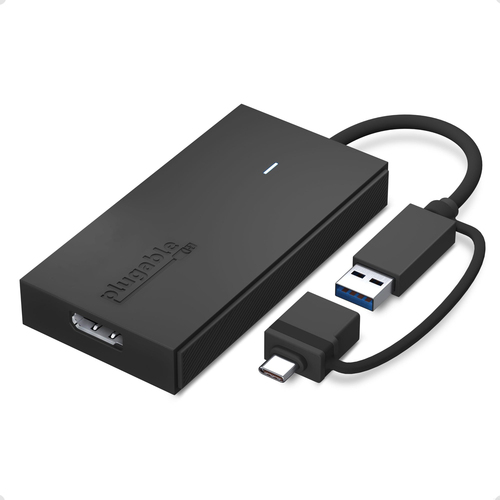
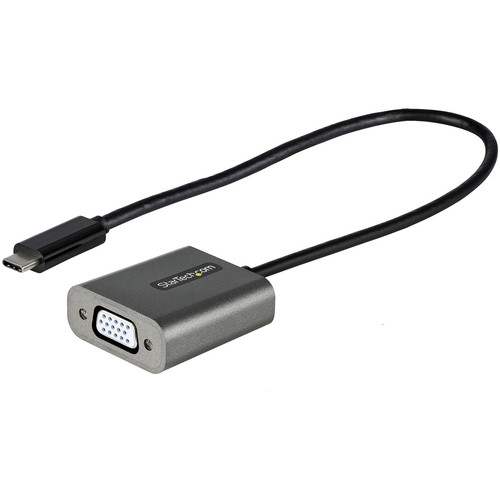
Plugable Technologies USB to DisplayPort Adapter. Connect one or more to any Mac or Windows System to add extra displays up to vs StarTech.com USB C to VGA Adapter - 1080p USB Type-C to VGA Adapter Dongle - USB-C (DP Alt Mode) to VGA Monitor/Display Video Converter - Thunderbolt 3 Compatib

Add a product
  • 14specifications compared
  • 9differ
  • 5identical
  • 28known for one product only

Key differences

The Plugable Technologies USB to DisplayPort Adapter. Connect one or more to any Mac or Windows System to add extra displays up to has 9 Hz more refresh rate at maximum resolution than the StarTech.com USB C to VGA Adapter - 1080p USB Type-C to VGA Adapter Dongle - USB-C (DP Alt Mode) to VGA Monitor/Display Video Converter - Thunderbolt 3 Compatib (69 Hz vs 60 Hz). The Plugable Technologies USB to DisplayPort Adapter. Connect one or more to any Mac or Windows System to add extra displays up to has 62 mm more width than the StarTech.com USB C to VGA Adapter - 1080p USB Type-C to VGA Adapter Dongle - USB-C (DP Alt Mode) to VGA Monitor/Display Video Converter - Thunderbolt 3 Compatib (100 mm vs 38 mm). The StarTech.com USB C to VGA Adapter - 1080p USB Type-C to VGA Adapter Dongle - USB-C (DP Alt Mode) to VGA Monitor/Display Video Converter - Thunderbolt 3 Compatib has 375 mm more depth than the Plugable Technologies USB to DisplayPort Adapter. Connect one or more to any Mac or Windows System to add extra displays up to (390 mm vs 15 mm). Only the Plugable Technologies USB to DisplayPort Adapter. Connect one or more to any Mac or Windows System to add extra displays up to has DisplayPort output. USB connector type: USB Type-A, USB Type-C on the Plugable Technologies USB to DisplayPort Adapter. Connect one or more to any Mac or Windows System to add extra displays up to, USB Type-C on the StarTech.com USB C to VGA Adapter - 1080p USB Type-C to VGA Adapter Dongle - USB-C (DP Alt Mode) to VGA Monitor/Display Video Converter - Thunderbolt 3 Compatib.

  • USB connector type
    • USB to DisplayPort Adapter. Connect one or more to any Mac or Windows System to add extra displays up to:USB Type-A, USB Type-C
    • USB C to VGA Adapter - 1080p USB Type-C to VGA Adapter Dongle - USB-C (DP Alt Mode) to VGA Monitor/Display Video Converter - Thunderbolt 3 Compatib:USB Type-C
  • DisplayPort output
    • USB to DisplayPort Adapter. Connect one or more to any Mac or Windows System to add extra displays up to:Yes
    • USB C to VGA Adapter - 1080p USB Type-C to VGA Adapter Dongle - USB-C (DP Alt Mode) to VGA Monitor/Display Video Converter - Thunderbolt 3 Compatib:No
  • Maximum resolution
    • USB to DisplayPort Adapter. Connect one or more to any Mac or Windows System to add extra displays up to:1920 x 1080 pixels
    • USB C to VGA Adapter - 1080p USB Type-C to VGA Adapter Dongle - USB-C (DP Alt Mode) to VGA Monitor/Display Video Converter - Thunderbolt 3 Compatib:1920 x 1200 pixels
  • Refresh rate at maximum resolution
    • USB to DisplayPort Adapter. Connect one or more to any Mac or Windows System to add extra displays up to:69 Hz
    • USB C to VGA Adapter - 1080p USB Type-C to VGA Adapter Dongle - USB-C (DP Alt Mode) to VGA Monitor/Display Video Converter - Thunderbolt 3 Compatib:60 Hz
  • Product colour
    • USB to DisplayPort Adapter. Connect one or more to any Mac or Windows System to add extra displays up to:Black
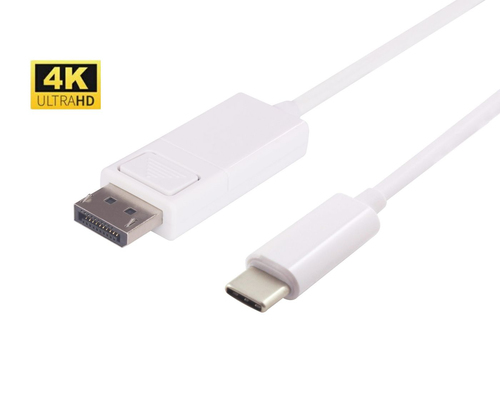
    • USB C to VGA Adapter - 1080p USB Type-C to VGA Adapter Dongle - USB-C (DP Alt Mode) to VGA Monitor/Display Video Converter - Thunderbolt 3 Compatib:White
  • Width
    • USB to DisplayPort Adapter. Connect one or more to any Mac or Windows System to add extra displays up to:100 mm
    • USB C to VGA Adapter - 1080p USB Type-C to VGA Adapter Dongle - USB-C (DP Alt Mode) to VGA Monitor/Display Video Converter - Thunderbolt 3 Compatib:38 mm
  • Depth
    • USB to DisplayPort Adapter. Connect one or more to any Mac or Windows System to add extra displays up to:15 mm
    • USB C to VGA Adapter - 1080p USB Type-C to VGA Adapter Dongle - USB-C (DP Alt Mode) to VGA Monitor/Display Video Converter - Thunderbolt 3 Compatib:390 mm
  • Height
    • USB to DisplayPort Adapter. Connect one or more to any Mac or Windows System to add extra displays up to:52.5 mm
    • USB C to VGA Adapter - 1080p USB Type-C to VGA Adapter Dongle - USB-C (DP Alt Mode) to VGA Monitor/Display Video Converter - Thunderbolt 3 Compatib:16 mm

Side by side

Differences highlightedShow differences only (off)
Comparison of UGA-DP-S, CDP2VGAEC
42 specifications
Performance4 differ
USB connector typeDiffersUSB Type-A, USB Type-CUSB Type-C
USB connector genderMaleMale
USB connector form factorStraightStraight
DVI outputNoNo
HDMI outputNoNo
DisplayPort outputDiffersYesNo
Number of displays supported11
VGA (D-Sub) outputKnown for oneUnknown — not stated by the sourceYes
Maximum resolutionDiffers1920 x 1080 pixels1920 x 1200 pixels
Refresh rate at maximum resolutionDiffers69 Hz60 Hz
USB versionKnown for one3.2 Gen 1 (3.1 Gen 1)Unknown — not stated by the source
DisplayPorts quantityKnown for one1Unknown — not stated by the source
HDCPKnown for oneNoUnknown — not stated by the source
DisplayPort versionKnown for one1.2Unknown — not stated by the source
Supported graphics resolutionsKnown for one720 x 576, 1280 x 720 (HD 720), 1920 x 1080 (HD 1080)Unknown — not stated by the source
LED indicatorsKnown for oneYesUnknown — not stated by the source
ChipsetKnown for oneSilicon Motion - SM768Unknown — not stated by the source
Data transfer rate (max)Known for one5 Gbit/sUnknown — not stated by the source
Design1 differ
Product colourDiffersBlackWhite
Integrated USB cableKnown for oneUnknown — not stated by the sourceYes
Weight & dimensions4 differ
WidthDiffers100 mm38 mm
DepthDiffers15 mm390 mm
HeightDiffers52.5 mm16 mm
WeightDiffers86 g29 g
USB cable lengthKnown for oneUnknown — not stated by the source0.3 m
Operational conditionsidentical
Operating temperature (T-T)Known for oneUnknown — not stated by the source0 - 45 °C
Storage temperature (T-T)Known for oneUnknown — not stated by the source-10 - 70 °C
Operating relative humidity (H-H)Known for oneUnknown — not stated by the source10 - 85%
Packaging dataidentical
Package widthKnown for oneUnknown — not stated by the source175 mm
Package depthKnown for oneUnknown — not stated by the source125 mm
Package heightKnown for oneUnknown — not stated by the source17 mm
Package weightKnown for oneUnknown — not stated by the source27 g
Technical detailsidentical
Compliance certificatesKnown for oneUnknown — not stated by the sourceCE, RoHS
Logistics dataidentical
Products per master (outer) caseKnown for oneUnknown — not stated by the source200 pc(s)
Master (outer) case widthKnown for oneUnknown — not stated by the source520 mm
Master (outer) case lengthKnown for oneUnknown — not stated by the source336 mm
Master (outer) case heightKnown for oneUnknown — not stated by the source218 mm
Harmonized System (HS) codeKnown for oneUnknown — not stated by the source84733020
System requirementsidentical
Mac compatibilityKnown for oneYesUnknown — not stated by the source
Windows operating systems supportedKnown for oneYesUnknown — not stated by the source
Other operating systems supportedKnown for oneChromeOSUnknown — not stated by the source
Packaging contentidentical
Quick installation guideKnown for oneYesUnknown — not stated by the source

A dash means the value is not stated by the source. Unknown values are never counted for or against a product, and there is no overall score.

More usb graphics adapter comparisons

All usb graphics adapter comparisons