Product comparison · 2 monitors

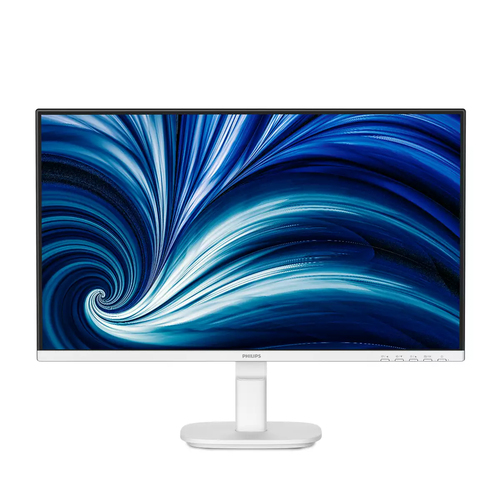
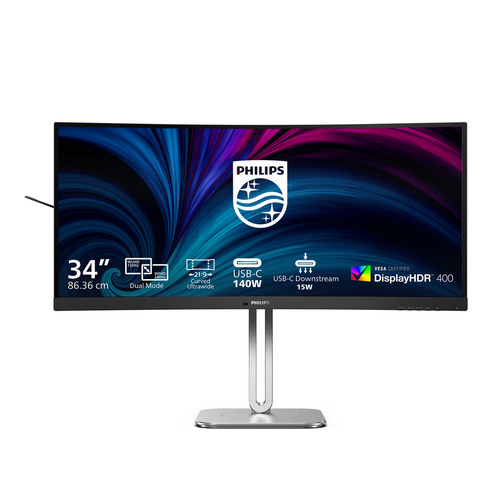
Philips 2000 series 24B2N2200GW/27 computer monitor vs Philips 5000 series 34B2U5900C/75 computer monitor

Add a product
  • 90specifications compared
  • 40differ
  • 50identical
  • 49known for one product only

Key differences

The Philips 5000 series 34B2U5900C/75 computer monitor has 5 :9 more native aspect ratio than the Philips 2000 series 24B2N2200GW/27 computer monitor (21:9 vs 16:9). The Philips 2000 series 24B2N2200GW/27 computer monitor has 2 ms more response time than the Philips 5000 series 34B2U5900C/75 computer monitor (4 ms vs 2 ms). The Philips 5000 series 34B2U5900C/75 computer monitor has 1,500 :1 more contrast ratio (typical) than the Philips 2000 series 24B2N2200GW/27 computer monitor (3000:1 vs 1500:1). Only the Philips 5000 series 34B2U5900C/75 computer monitor has built-in USB hub. Only the Philips 5000 series 34B2U5900C/75 computer monitor has height adjustment.

  • Display diagonal
    • 2000 series 24B2N2200GW/27 computer monitor:60.5 cm (23.8")
    • 5000 series 34B2U5900C/75 computer monitor:86.4 cm (34")
  • Display resolution
    • 2000 series 24B2N2200GW/27 computer monitor:1920 x 1080 pixels
    • 5000 series 34B2U5900C/75 computer monitor:5120 x 2160 pixels
  • Native aspect ratio
    • 2000 series 24B2N2200GW/27 computer monitor:16:9
    • 5000 series 34B2U5900C/75 computer monitor:21:9
  • HD type
    • 2000 series 24B2N2200GW/27 computer monitor:Full HD
    • 5000 series 34B2U5900C/75 computer monitor:WUHD
  • Panel type
    • 2000 series 24B2N2200GW/27 computer monitor:IPS
    • 5000 series 34B2U5900C/75 computer monitor:VA
  • Response time
    • 2000 series 24B2N2200GW/27 computer monitor:4 ms
    • 5000 series 34B2U5900C/75 computer monitor:2 ms
  • Screen shape
    • 2000 series 24B2N2200GW/27 computer monitor:Flat
    • 5000 series 34B2U5900C/75 computer monitor:Curved
  • Contrast ratio (typical)
    • 2000 series 24B2N2200GW/27 computer monitor:1500:1
    • 5000 series 34B2U5900C/75 computer monitor:3000:1

Side by side

Differences highlightedShow differences only (on)
Comparison of 24B2N2200GW/27, 34B2U5900C/75
139 specifications
Display19 differ
Display diagonalDiffers60.5 cm (23.8")86.4 cm (34")
Display resolutionDiffers1920 x 1080 pixels5120 x 2160 pixels
Native aspect ratioDiffers16:921:9
HD typeDiffersFull HDWUHD
Panel typeDiffersIPSVA
Display brightness (peak)Known for oneUnknown — not stated by the source450 cd/m²
Response timeDiffers4 ms2 ms
Screen shapeDiffersFlatCurved
Screen curvature ratingKnown for oneUnknown — not stated by the source1500R
Contrast ratio (typical)Differs1500:13000:1
Contrast ratio (dynamic)Known for oneUnknown — not stated by the source80000000:1
Maximum refresh rateDiffers144 Hz120 Hz
Pixel pitchDiffers0.2745 x 0.2745 mm0.15534 x 0.15405 mm
Pixel densityDiffers93 ppi164 ppi
Horizontal scan rangeKnown for oneUnknown — not stated by the source30 - 270 kHz
Vertical scan rangeDiffers48 - 75 Hz48 - 120 Hz
Viewable size, horizontalDiffers52.7 cm79.5 cm
Viewable size, verticalDiffers29.6 cm33.3 cm
Display diagonal (metric)Differs60.47 cm86.21 cm
High Dynamic Range (HDR) supportedKnown for oneUnknown — not stated by the sourceYes
High Dynamic Range (HDR) technologyKnown for oneUnknown — not stated by the sourceDisplayHDR 400
Colour gamut standardDifferssRGB, NTSCsRGB, NTSC, DCI-P3, Adobe RGB
sRGB coverage (typical)Differs111%122%
NTSC coverage (typical)Differs101%111%
Adobe RGB coverageKnown for oneUnknown — not stated by the source83%
DCI-P3 coverageKnown for oneUnknown — not stated by the source95%
Display panel sizeDiffers23.8 inch/60.47 cm34inch/86.21cm
Colour gamutKnown for one101%Unknown — not stated by the source
Performanceidentical
Component video syncKnown for oneUnknown — not stated by the sourceSeparate Sync, Sync-on-green (SOG)
Low Blue Light technologyKnown for oneUnknown — not stated by the sourceYes
Multimedia1 differ
RMS rated powerDiffers4 W10 W
Design3 differ
Market positioningDiffersBusinessOffice
Product colourDiffersWhiteGrey
Feet colourDiffersWhiteSilver
Front bezel colourKnown for oneWhiteUnknown — not stated by the source
Ports & interfaces4 differ
Built-in USB hubDiffersNoYes
USB hub versionKnown for oneUnknown — not stated by the source3.2 Gen 2 (3.1 Gen 2)
Number of USB Type-C upstream ports quantityKnown for oneUnknown — not stated by the source2
USB Type-A downstream ports quantityKnown for oneUnknown — not stated by the source3
USB Type-C downstream ports quantityKnown for oneUnknown — not stated by the source2
USB Type-C DisplayPort Alternate ModeKnown for oneUnknown — not stated by the sourceYes
USB Power Delivery (USB PD)Known for oneUnknown — not stated by the sourceYes
USB Power Delivery up toKnown for oneUnknown — not stated by the source140 W
HDMI ports quantityDiffers12
HDMI versionDiffers1.42.1
DisplayPort versionKnown for oneUnknown — not stated by the source1.4
Built-in KVM switchKnown for oneUnknown — not stated by the sourceYes
HDCP versionDiffers1.42.3
VGA (D-Sub) ports quantityKnown for one1Unknown — not stated by the source
DisplayPort out versionKnown for one1.4Unknown — not stated by the source
Audio inputKnown for oneYesUnknown — not stated by the source
Networkidentical
Ethernet LANKnown for oneUnknown — not stated by the sourceYes
Ergonomics2 differ
Height adjustmentDiffersNoYes
Adjustable height (max)Known for oneUnknown — not stated by the source18 cm
SwivellingKnown for oneUnknown — not stated by the sourceYes
Swivel angle rangeKnown for oneUnknown — not stated by the source-180 - 180°
Tilt angle rangeDiffers-5 - 25°-5 - 30°
Picture-in-PictureKnown for oneUnknown — not stated by the sourceYes
Power5 differ
Energy efficiency class (SDR)DiffersNot availableE
Energy efficiency class (HDR)DiffersNot availableG
Energy consumption (SDR) per 1000 hoursKnown for oneUnknown — not stated by the source25 kWh
Energy consumption (HDR) per 1000 hoursKnown for oneUnknown — not stated by the source62 kWh
Power consumption (typical)Differs13.37 W37.35 W
Power consumption (off)Differs0.3 W0 W
Power consumption (PowerSave)Differs8.5 W25 W
Energy efficiency scaleKnown for oneUnknown — not stated by the sourceA to G
Weight & dimensions2 differ
Width (with stand)Known for oneUnknown — not stated by the source807 mm
Depth (with stand)Known for oneUnknown — not stated by the source281 mm
Height (with stand)Known for oneUnknown — not stated by the source575 mm
Weight (with stand)Differs2.88 kg10.7 kg
Width (without stand)Known for oneUnknown — not stated by the source807 mm
Depth (without stand)Known for oneUnknown — not stated by the source112 mm
Height (without stand)Known for oneUnknown — not stated by the source369 mm
Weight (without stand)Differs2.6 kg7.89 kg
Packaging data1 differ
Package widthKnown for oneUnknown — not stated by the source980 mm
Package depthKnown for oneUnknown — not stated by the source188 mm
Package heightKnown for oneUnknown — not stated by the source525 mm
Package weightDiffers5.04 kg15.8 kg
Packaging contentidentical
Stand includedKnown for oneUnknown — not stated by the sourceYes
Cables includedKnown for oneUnknown — not stated by the sourceDisplayPort, HDMI, Power, USB Type-A to USB Type-C, USB Type-C, USB Type-C to USB Type-C
ManualKnown for oneUnknown — not stated by the sourceYes
Other features3 differ
HBR3 supportKnown for oneUnknown — not stated by the sourceYes
Compatible operating systemsDiffersDDC/CI, Mac OS X, sRGB, Windows 11 / 10DDC/CI, Mac OS, sRGB, Windows 11 / 10
Picture-by-Picture (PbP)Known for oneUnknown — not stated by the sourceYes
Philips SmartUniformityKnown for oneUnknown — not stated by the source93 - 105%
Delta EKnown for oneUnknown — not stated by the source1
MultiViewKnown for oneUnknown — not stated by the source2x devices, PIP/PBP mode
Regulatory ApprovalsDiffersCB, CE Mark, CEL, CCC, CECP, UKCA, EMF, FCC, ETL, CEC, South Africa Energy, TÜV Rheinland Circular Polarization, TÜV Rheinland Low Blue Light (Hardware Solution), eyesafe® CERTIFIED 2.0CB, CE Mark, TUV/GS, TUV Ergo, TCO Certified, TCO Certified Edge, EAC, EAC ROHS, KC, CEL, CCC, CECP, KCC, UKCA, EMF, FCC, ICES-003, TÜV Rheinland Low Blue Light (Hardware Solution), eyesafe® CERTIFIED 2.0
User controlsDiffersSmartImage, Input, Brightness, Menu, Power On/OffSmartImage, Input, User, Menu, Power On/Off

A dash means the value is not stated by the source. Unknown values are never counted for or against a product, and there is no overall score.

More monitor comparisons

All monitor comparisons