Product comparison · 2 monitors

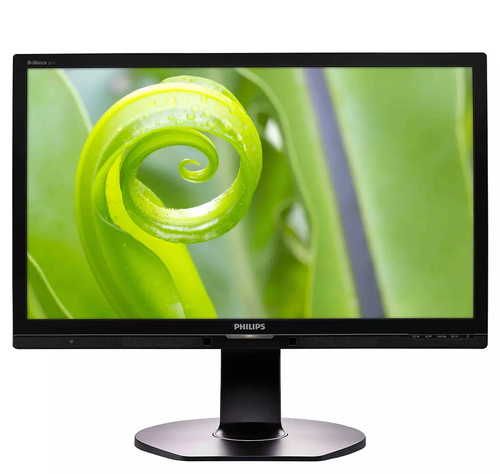
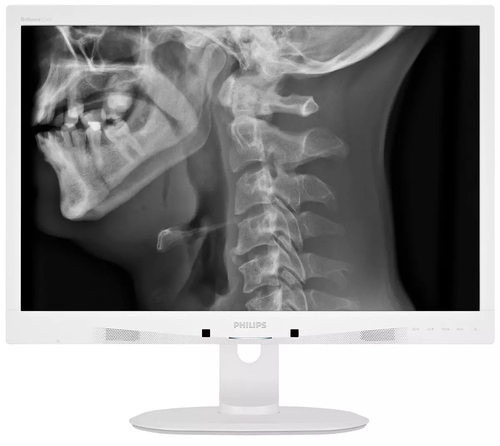
Philips Brilliance 241P6QPJEB/93 computer monitor vs Philips Brilliance C240P4QPYEW/61 computer monitor

Add a product
  • 105specifications compared
  • 44differ
  • 61identical
  • 24known for one product only

Key differences

The Philips Brilliance C240P4QPYEW/61 computer monitor has 50 cd/m² more display brightness (typical) than the Philips Brilliance 241P6QPJEB/93 computer monitor (300 cd/m² vs 250 cd/m²). The Philips Brilliance 241P6QPJEB/93 computer monitor has 0.9 cm more viewable size, horizontal than the Philips Brilliance C240P4QPYEW/61 computer monitor (52.7 cm vs 51.8 cm). The Philips Brilliance C240P4QPYEW/61 computer monitor has 2.8 cm more viewable size, vertical than the Philips Brilliance 241P6QPJEB/93 computer monitor (32.4 cm vs 29.6 cm). Display diagonal: 60.5 cm (23.8") on the Philips Brilliance 241P6QPJEB/93 computer monitor, 61 cm (24") on the Philips Brilliance C240P4QPYEW/61 computer monitor. Display resolution: 1920 x 1080 pixels on the Philips Brilliance 241P6QPJEB/93 computer monitor, 1920 x 1200 pixels on the Philips Brilliance C240P4QPYEW/61 computer monitor.

  • Display diagonal
    • Brilliance 241P6QPJEB/93 computer monitor:60.5 cm (23.8")
    • Brilliance C240P4QPYEW/61 computer monitor:61 cm (24")
  • Display resolution
    • Brilliance 241P6QPJEB/93 computer monitor:1920 x 1080 pixels
    • Brilliance C240P4QPYEW/61 computer monitor:1920 x 1200 pixels
  • Native aspect ratio
    • Brilliance 241P6QPJEB/93 computer monitor:16:9
    • Brilliance C240P4QPYEW/61 computer monitor:16:10
  • Panel type
    • Brilliance 241P6QPJEB/93 computer monitor:AH-IPS
    • Brilliance C240P4QPYEW/61 computer monitor:IPS
  • Display brightness (typical)
    • Brilliance 241P6QPJEB/93 computer monitor:250 cd/m²
    • Brilliance C240P4QPYEW/61 computer monitor:300 cd/m²
  • Pixel pitch
    • Brilliance 241P6QPJEB/93 computer monitor:0.2745 x 0.2745 mm
    • Brilliance C240P4QPYEW/61 computer monitor:0.270 x 0.270 mm
  • Horizontal scan range
    • Brilliance 241P6QPJEB/93 computer monitor:30 - 83 kHz
    • Brilliance C240P4QPYEW/61 computer monitor:24 - 94 kHz
  • Vertical scan range
    • Brilliance 241P6QPJEB/93 computer monitor:56 - 76 Hz
    • Brilliance C240P4QPYEW/61 computer monitor:48 - 85 Hz

Side by side

Differences highlightedShow differences only (on)
Comparison of 241P6QPJEB/93, C240P4QPYEW/61
129 specifications
Display13 differ
Display diagonalDiffers60.5 cm (23.8")61 cm (24")
Display resolutionDiffers1920 x 1080 pixels1920 x 1200 pixels
Native aspect ratioDiffers16:916:10
Panel typeDiffersAH-IPSIPS
Display brightness (typical)Differs250 cd/m²300 cd/m²
Supported graphics resolutionsDiffers1920 x 1080 (HD 1080)640 x 480 (VGA), 800 x 600 (SVGA), 1024 x 768 (XGA), 1360 x 768 (WXGA), 1920 x 1080 (HD 1080), 1920 x 1200 (WUXGA)
Supported video modesKnown for one1080pUnknown — not stated by the source
Aspect ratioKnown for one16:9Unknown — not stated by the source
Contrast ratio (dynamic)Known for one20000000:1Unknown — not stated by the source
SmartResponseKnown for one5 msUnknown — not stated by the source
Pixel pitchDiffers0.2745 x 0.2745 mm0.270 x 0.270 mm
Horizontal scan rangeDiffers30 - 83 kHz24 - 94 kHz
Vertical scan rangeDiffers56 - 76 Hz48 - 85 Hz
Viewable size, horizontalDiffers52.7 cm51.8 cm
Viewable size, verticalDiffers29.6 cm32.4 cm
Display diagonal (metric)Differs60.5 cm61 cm
Display panel sizeDiffers23.8 inch / 60.5 cm24 inch / 61 cm
Screen shapeKnown for oneUnknown — not stated by the sourceFlat
Performance2 differ
Windows operating systems supportedDiffersYesWindows 7 Enterprise, Windows 7 Enterprise x64, Windows 7 Home Basic, Windows 7 Home Basic x64, Windows 7 Home Premium, Windows 7 Home Premium x64, Windows 7 Professional, Windows 7 Professional x64, Windows 7 Starter, Windows 7 Starter x64, Windows 7 Ultimate, Windows 7 Ultimate x64, Windows 8, Win
Mac operating systems supportedDiffersYesMac OS X 10.0 Cheetah, Mac OS X 10.1 Puma, Mac OS X 10.10 Yosemite, Mac OS X 10.11 El Capitan, Mac OS X 10.2 Jaguar, Mac OS X 10.3 Panther, Mac OS X 10.4 Tiger, Mac OS X 10.5 Leopard, Mac OS X 10.6 Snow Leopard, Mac OS X 10.7 Lion, Mac OS X 10.8 Mountain Lion, Mac OS X 10.9 Mavericks
NVIDIA G-SYNCKnown for oneUnknown — not stated by the sourceNo
AMD FreeSyncKnown for oneUnknown — not stated by the sourceNo
Design3 differ
Product colourDiffersBlackWhite
Front bezel colourDiffersBlackWhite
Feet colourDiffersBlackWhite
Market positioningKnown for oneUnknown — not stated by the sourceMedical
Ports & interfaces3 differ
USB versionKnown for one3.2 Gen 1 (3.1 Gen 1)Unknown — not stated by the source
USB hub versionDiffers3.2 Gen 1 (3.1 Gen 1)2.0
Number of upstream portsDiffers14
USB Type-A downstream ports quantityKnown for one4Unknown — not stated by the source
HDMI ports quantityDiffers10
HDCPKnown for oneYesUnknown — not stated by the source
AC (power) inKnown for oneYesUnknown — not stated by the source
Mobile High-Definition Link (MHL)Known for oneYesUnknown — not stated by the source
Ergonomics3 differ
Swivel angle rangeDiffers-175 - 175°-65 - 65°
Number of OSD languagesDiffers208
LED indicatorsDiffersPowerOperation, Stand-by
Power2 differ
Power consumption (typical)Differs18.27 W31.4 W
Power consumption (standby)Differs0.3 W0.5 W
Power consumption (PowerSave)Known for one14 WUnknown — not stated by the source
Power supply typeKnown for oneInternalUnknown — not stated by the source
Operational conditionsidentical
Relative humidityKnown for one20 - 80%Unknown — not stated by the source
Weight & dimensions8 differ
Width (with stand)Differs563 mm555 mm
Depth (with stand)Differs257 mm244 mm
Height (with stand)Differs511 mm550 mm
Weight (with stand)Differs6.47 kg6.97 kg
Width (without stand)Differs563 mm555 mm
Depth (without stand)Differs53 mm65 mm
Height (without stand)Differs351 mm388 mm
Weight (without stand)Differs3.98 kg4.64 kg
Packaging data4 differ
Package widthDiffers619 mm632 mm
Package depthDiffers184 mm286 mm
Package heightDiffers525 mm457 mm
Package weightDiffers9.13 kg9.8 kg
Packaging content1 differ
Bundled softwareDiffersSmartControl PremiumSmartControl
Other features5 differ
ECO modeKnown for oneYesUnknown — not stated by the source
Monitor sync input signalDiffersSeparate Sync; Sync on GreenSync on Green; Separate Sync
Power consumption (economy mode)Known for one14 WUnknown — not stated by the source
Signal inputDiffersVGA (Analog ); DVI-D (digital, HDCP); DisplayPort x 1; MHL-HDMI (digital, HDCP)DisplayPort 1.2; DVI-D (digital, HDCP); VGA (Analog )
USB charging portKnown for oneYesUnknown — not stated by the source
CertificationDiffersCCC, CE Mark, cETLus, FCC Class B, SEMKO, TCO 6.0, TUV Ergo, TUV/GS, WEEE, CECP, CU-EAC, EPA, E-standby, ICES-003, J-MOSS, KC, PSB, PSE, RoHSRoHS, IEC/EN60601-1-2, CE, GOST, JIS Z2801, Energy Star, TUV/GS, TUV Ergo, TCO 6.0, ISO 13485, WEEE
Picture enhancementDiffersSmartImageSmartImage Clinic
Regulatory ApprovalsKnown for oneCCC; CE Mark; cETLus; FCC Class B; SEMKO; TUV Ergo; TUV/GS; WEEE; CECP; CU-EAC; EPA; E-standby; ICES-003; J-MOSS; KC; PSB; PSEUnknown — not stated by the source
User controlsDiffersSmartImage; Volume; PowerSensor; Menu; Power On/OffSmartImage Clinic; PowerSensor; Menu; Power On/Off; 4:3 / Wide
Compliance certificatesKnown for oneUnknown — not stated by the sourceElectromagnetic Compatibility (EMC), CE, TÜV mark, CCC, CECP, RCM, cUL, UL
DICOMKnown for oneUnknown — not stated by the sourceYes
Recycling dataidentical
Overall recyclability rateKnown for one65%Unknown — not stated by the source
Product post-consumer recycled plasticKnown for one65%Unknown — not stated by the source

A dash means the value is not stated by the source. Unknown values are never counted for or against a product, and there is no overall score.

More monitor comparisons

All monitor comparisons