Product comparison · 2 monitors

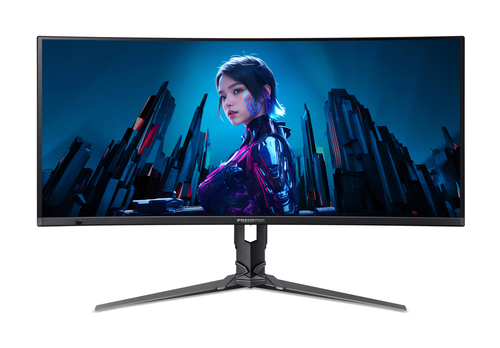
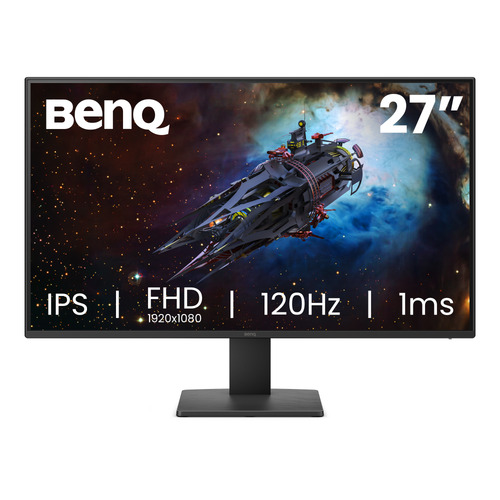
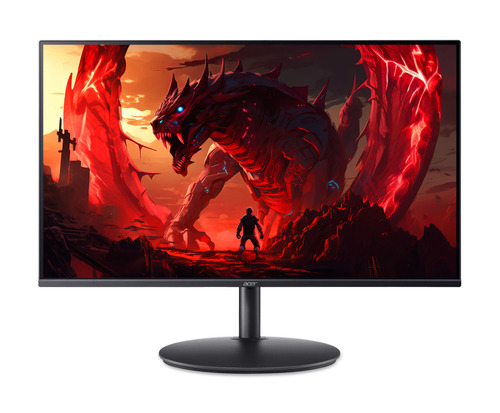
Acer X34 X5 Widescreen Gaming LCD Monitor vs BenQ GW2791P 27" IPS 1920x1080 120Hz 1ms Eye-Care Widescreen Gaming Monitor

Add a product
  • 12specifications compared
  • 9differ
  • 3identical
  • 65known for one product only

Key differences

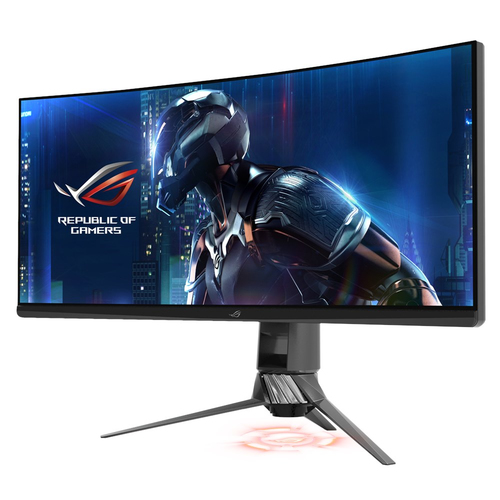
The Acer X34 X5 Widescreen Gaming LCD Monitor has 5 :9 more native aspect ratio than the BenQ GW2791P 27" IPS 1920x1080 120Hz 1ms Eye-Care Widescreen Gaming Monitor (21:9 vs 16:9). The BenQ GW2791P 27" IPS 1920x1080 120Hz 1ms Eye-Care Widescreen Gaming Monitor has 71 mm more depth (with stand) than the Acer X34 X5 Widescreen Gaming LCD Monitor (181.9 mm vs 110.9 mm). The Acer X34 X5 Widescreen Gaming LCD Monitor has 2.85 kg more weight (with stand) than the BenQ GW2791P 27" IPS 1920x1080 120Hz 1ms Eye-Care Widescreen Gaming Monitor (6.71 kg vs 3.86 kg). Only the Acer X34 X5 Widescreen Gaming LCD Monitor has built-in speaker(s). Display technology: LCD on the Acer X34 X5 Widescreen Gaming LCD Monitor, LED on the BenQ GW2791P 27" IPS 1920x1080 120Hz 1ms Eye-Care Widescreen Gaming Monitor.

  • Native aspect ratio
    • X34 X5 Widescreen Gaming LCD Monitor:21:9
    • GW2791P 27" IPS 1920x1080 120Hz 1ms Eye-Care Widescreen Gaming Monitor:16:9
  • Display technology
    • X34 X5 Widescreen Gaming LCD Monitor:LCD
    • GW2791P 27" IPS 1920x1080 120Hz 1ms Eye-Care Widescreen Gaming Monitor:LED
  • HD type
    • X34 X5 Widescreen Gaming LCD Monitor:UltraWide Quad HD
    • GW2791P 27" IPS 1920x1080 120Hz 1ms Eye-Care Widescreen Gaming Monitor:Full HD
  • Screen shape
    • X34 X5 Widescreen Gaming LCD Monitor:Curved
    • GW2791P 27" IPS 1920x1080 120Hz 1ms Eye-Care Widescreen Gaming Monitor:Flat
  • Colour gamut standard
    • X34 X5 Widescreen Gaming LCD Monitor:DCI-P3
    • GW2791P 27" IPS 1920x1080 120Hz 1ms Eye-Care Widescreen Gaming Monitor:sRGB
  • Built-in speaker(s)
    • X34 X5 Widescreen Gaming LCD Monitor:Yes
    • GW2791P 27" IPS 1920x1080 120Hz 1ms Eye-Care Widescreen Gaming Monitor:No
  • Market positioning
    • X34 X5 Widescreen Gaming LCD Monitor:Gaming
    • GW2791P 27" IPS 1920x1080 120Hz 1ms Eye-Care Widescreen Gaming Monitor:Office
  • Depth (with stand)
    • X34 X5 Widescreen Gaming LCD Monitor:110.9 mm
    • GW2791P 27" IPS 1920x1080 120Hz 1ms Eye-Care Widescreen Gaming Monitor:181.9 mm

Side by side

Differences highlightedShow differences only (on)
Comparison of UM.CXXEE.502, GW2791P
77 specifications
Display5 differ
Display diagonalKnown for oneUnknown — not stated by the source68.6 cm (27")
Display resolutionKnown for oneUnknown — not stated by the source1920 x 1080 pixels
Native aspect ratioDiffers21:916:9
Display technologyDiffersLCDLED
HD typeDiffersUltraWide Quad HDFull HD
Panel typeKnown for oneUnknown — not stated by the sourceIPS
LED backlightKnown for oneUnknown — not stated by the sourceYes
Display brightness (typical)Known for oneUnknown — not stated by the source250 cd/m²
Response timeKnown for oneUnknown — not stated by the source5 ms
Response time measurement typeKnown for oneUnknown — not stated by the sourceGTG (Gray to Gray)
Anti-glare screenKnown for oneUnknown — not stated by the sourceYes
Screen shapeDiffersCurvedFlat
Contrast ratio (typical)Known for oneUnknown — not stated by the source1500:1
Maximum refresh rateKnown for oneUnknown — not stated by the source120 Hz
Viewing angle, horizontalKnown for oneUnknown — not stated by the source178°
Viewing angle, verticalKnown for oneUnknown — not stated by the source178°
Display number of coloursKnown for oneUnknown — not stated by the source16.7 million colours
Pixel densityKnown for oneUnknown — not stated by the source82 ppi
Colour gamut standardDiffersDCI-P3sRGB
Performanceidentical
Flicker-free technologyKnown for oneUnknown — not stated by the sourceYes
Low Blue Light technologyKnown for oneUnknown — not stated by the sourceYes
Smart modesKnown for oneUnknown — not stated by the sourceStandard, Game, ePaper, Cinema
Multimedia1 differ
Built-in speaker(s)DiffersYesNo
Built-in cameraKnown for oneUnknown — not stated by the sourceNo
Number of speakersKnown for one2Unknown — not stated by the source
Design1 differ
Market positioningDiffersGamingOffice
Colour nameKnown for oneBlackUnknown — not stated by the source
Ports & interfacesidentical
HDMI ports quantityKnown for oneUnknown — not stated by the source1
HDMI versionKnown for oneUnknown — not stated by the source1.4
DisplayPorts quantityKnown for oneUnknown — not stated by the source1
DisplayPort versionKnown for oneUnknown — not stated by the source1.2
Headphone outKnown for oneUnknown — not stated by the sourceYes
Headphone outputsKnown for oneUnknown — not stated by the source1
HDCPKnown for oneUnknown — not stated by the sourceYes
HDCP versionKnown for oneUnknown — not stated by the source1.4
Audio inputKnown for oneYesUnknown — not stated by the source
Audio outputKnown for oneYesUnknown — not stated by the source
Ergonomicsidentical
VESA mountingKnown for oneUnknown — not stated by the sourceYes
Panel mounting interfaceKnown for oneUnknown — not stated by the source100 x 100 mm
Wall mountableKnown for oneUnknown — not stated by the sourceYes
Height adjustmentKnown for oneUnknown — not stated by the sourceYes
Tilt adjustmentKnown for oneUnknown — not stated by the sourceYes
Tilt angle rangeKnown for oneUnknown — not stated by the source-5 - 20°
On Screen Display (OSD)Known for oneUnknown — not stated by the sourceYes
On Screen Display (OSD) languagesKnown for oneUnknown — not stated by the sourceBulgarian, Arabic, Simplified Chinese, Traditional Chinese, Czech, German, English, French, Hungarian, Italian, Japanese, Korean, Dutch, Polish, Portuguese, Romanian, Russian, Spanish, Swedish, Greek, Ukrainian
Number of OSD languagesKnown for oneUnknown — not stated by the source20
Poweridentical
Energy efficiency class (SDR)Known for oneUnknown — not stated by the sourceD
Energy efficiency class (HDR)Known for oneUnknown — not stated by the sourceNot available
Energy consumption (SDR) per 1000 hoursKnown for oneUnknown — not stated by the source16 kWh
Power consumption (typical)Known for oneUnknown — not stated by the source25 W
Power consumption (standby)Known for oneUnknown — not stated by the source0.5 W
Power consumption (max)Known for oneUnknown — not stated by the source33 W
AC input voltageKnown for oneUnknown — not stated by the source100 - 240 V
Power supply typeKnown for oneUnknown — not stated by the sourceInternal
Energy efficiency scaleKnown for oneUnknown — not stated by the sourceA to G
Weight & dimensions2 differ
Width (with stand)Known for oneUnknown — not stated by the source616.6 mm
Depth (with stand)Differs110.9 mm181.9 mm
Height (with stand)Known for oneUnknown — not stated by the source455.6 mm
Weight (with stand)Differs6.71 kg3.86 kg
Width (without stand)Known for oneUnknown — not stated by the source616.6 mm
Depth (without stand)Known for oneUnknown — not stated by the source46.8 mm
Height (without stand)Known for oneUnknown — not stated by the source371.4 mm
Weight (without stand)Known for oneUnknown — not stated by the source3.48 kg
Packaging contentidentical
Stand includedKnown for oneUnknown — not stated by the sourceYes
Cables includedKnown for oneUnknown — not stated by the sourceHDMI
Quick start guideKnown for oneUnknown — not stated by the sourceYes
Sustainabilityidentical
Sustainability certificatesKnown for oneUnknown — not stated by the sourceENERGY STAR
Other featuresidentical
Country of originKnown for oneChinaUnknown — not stated by the source
HeightKnown for one361.2 mmUnknown — not stated by the source
ManufacturerKnown for oneAcer, IncUnknown — not stated by the source
Packaging contentKnown for one1 x Predator X34 X5 Widescreen Gaming LCD Monitor 1 x Power Cord (UK) 1 x USB Type-C Cable 1 x USB 3.0 Cable 1 x HDMI CableUnknown — not stated by the source
WeightKnown for one6.71 kgUnknown — not stated by the source
Warranty periodKnown for one2 year(s)Unknown — not stated by the source
AI-poweredKnown for oneYesUnknown — not stated by the source

A dash means the value is not stated by the source. Unknown values are never counted for or against a product, and there is no overall score.

More monitor comparisons

All monitor comparisons