Product comparison · 2 inkjet printers

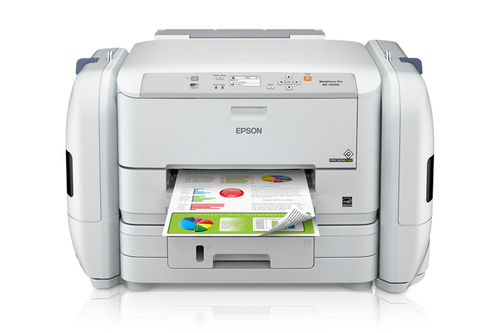
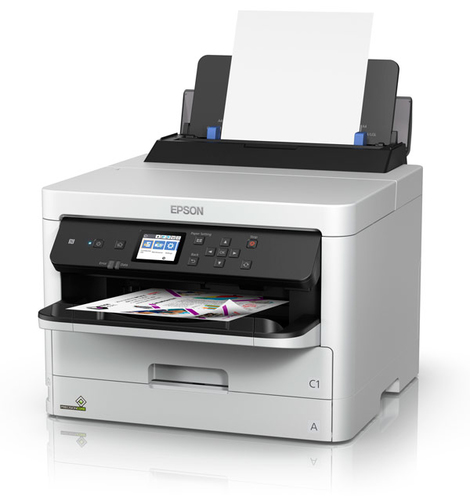
Epson WorkForce Pro WF-C5390DW inkjet printer Colour vs Epson WorkForce Pro WF-R5190 inkjet printer Colour

Add a product
  • 30specifications compared
  • 19differ
  • 11identical
  • 40known for one product only

Key differences

The Epson WorkForce Pro WF-C5390DW inkjet printer Colour has 30,000 pages per month more maximum duty cycle than the Epson WorkForce Pro WF-R5190 inkjet printer Colour (75000 pages per month vs 45000 pages per month). The Epson WorkForce Pro WF-C5390DW inkjet printer Colour has 14 ppm more print speed (black, normal quality, A4/US Letter) than the Epson WorkForce Pro WF-R5190 inkjet printer Colour (34 ppm vs 20 ppm). The Epson WorkForce Pro WF-C5390DW inkjet printer Colour has 14 ppm more print speed (colour, normal quality, A4/US Letter) than the Epson WorkForce Pro WF-R5190 inkjet printer Colour (34 ppm vs 20 ppm). Envelopes sizes: 10, C4, C5, C6, DL on the Epson WorkForce Pro WF-C5390DW inkjet printer Colour, 10 on the Epson WorkForce Pro WF-R5190 inkjet printer Colour. Photo paper sizes: 10x15,13x18 cm on the Epson WorkForce Pro WF-C5390DW inkjet printer Colour, 10x15,20x25 cm on the Epson WorkForce Pro WF-R5190 inkjet printer Colour.

  • Maximum duty cycle
    • WorkForce Pro WF-C5390DW inkjet printer Colour:75000 pages per month
    • WorkForce Pro WF-R5190 inkjet printer Colour:45000 pages per month
  • Print speed (black, normal quality, A4/US Letter)
    • WorkForce Pro WF-C5390DW inkjet printer Colour:34 ppm
    • WorkForce Pro WF-R5190 inkjet printer Colour:20 ppm
  • Print speed (colour, normal quality, A4/US Letter)
    • WorkForce Pro WF-C5390DW inkjet printer Colour:34 ppm
    • WorkForce Pro WF-R5190 inkjet printer Colour:20 ppm
  • Total number of input trays
    • WorkForce Pro WF-C5390DW inkjet printer Colour:1
    • WorkForce Pro WF-R5190 inkjet printer Colour:2
  • Total input capacity
    • WorkForce Pro WF-C5390DW inkjet printer Colour:330 sheets
    • WorkForce Pro WF-R5190 inkjet printer Colour:500 sheets
  • Maximum input capacity
    • WorkForce Pro WF-C5390DW inkjet printer Colour:1830 sheets
    • WorkForce Pro WF-R5190 inkjet printer Colour:580 sheets
  • Envelopes sizes
    • WorkForce Pro WF-C5390DW inkjet printer Colour:10, C4, C5, C6, DL
    • WorkForce Pro WF-R5190 inkjet printer Colour:10
  • Photo paper sizes
    • WorkForce Pro WF-C5390DW inkjet printer Colour:10x15,13x18 cm
    • WorkForce Pro WF-R5190 inkjet printer Colour:10x15,20x25 cm

Side by side

Differences highlightedShow differences only (off)
Comparison of WF-C5390DW, WF-R5190
70 specifications
Features2 differ
ColourYesYes
Maximum duty cycleDiffers75000 pages per month45000 pages per month
Recommended duty cycleKnown for oneUnknown — not stated by the source1 - 2500 pages per month
Page description languagesDiffersESC/P-R, PCL 5c, PCL 6, PDF 1.7, PostScript 3ESC/P-R, PCL 5, PCL 6, PostScript 3
Printing coloursBlack, Cyan, Magenta, YellowBlack, Cyan, Magenta, Yellow
Ink typeKnown for oneUnknown — not stated by the sourcePigment-based ink
Number of print cartridgesKnown for one4Unknown — not stated by the source
Duplex printingKnown for oneYesUnknown — not stated by the source
Duplex printing modeKnown for oneAutoUnknown — not stated by the source
Printing2 differ
Maximum resolution4800 x 1200 DPI4800 x 1200 DPI
Print speed (black, normal quality, A4/US Letter)Differs34 ppm20 ppm
Print speed (colour, normal quality, A4/US Letter)Differs34 ppm20 ppm
Time to first page (black, normal)Known for one4.8 sUnknown — not stated by the source
Time to first page (colour, normal)Known for one5.3 sUnknown — not stated by the source
Input & output capacity3 differ
Total number of input traysDiffers12
Total input capacityDiffers330 sheets500 sheets
Maximum input capacityDiffers1830 sheets580 sheets
Total output capacityKnown for one150 sheetsUnknown — not stated by the source
Maximum number of input traysKnown for one3Unknown — not stated by the source
Paper handling3 differ
Maximum print sizeKnown for oneUnknown — not stated by the source216 x 1200 mm
Paper tray media typesDiffersPhoto paper, Plain paperGlossy paper, Matte paper, Plain paper, Semi-glossy paper
ISO A-series sizes (A0...A9)A4, A5, A6A4, A5, A6
ISO B-series sizes (B0...B9)Known for oneUnknown — not stated by the sourceB5
Envelopes sizesDiffers10, C4, C5, C6, DL10
Photo paper sizesDiffers10x15,13x18 cm10x15,20x25 cm
Photo paper sizes (imperial)Known for oneUnknown — not stated by the source4x6,5x7,8x10,8.5x11
Maximum ISO A-series paper sizeKnown for oneA4Unknown — not stated by the source
Non-ISO print media sizesKnown for oneLegal, LetterUnknown — not stated by the source
Paper tray media weightKnown for one64 - 256 g/m²Unknown — not stated by the source
Ports & interfacesidentical
USB portYesYes
USB 2.0 ports quantityKnown for oneUnknown — not stated by the source1
Direct printingKnown for oneYesUnknown — not stated by the source
Network2 differ
Ethernet LANYesYes
Wi-FiYesYes
Wi-Fi DirectYesYes
Wi-Fi standardsKnown for oneUnknown — not stated by the source802.11b, 802.11g, Wi-Fi 4 (802.11n)
Security algorithmsDiffers64-bit WEP, 128-bit WEP, WPA-AES, WPA-PSK, WPA2-AES, WPA2-PSK64-bit WEP, 128-bit WEP, WPA-PSK
Supported network protocolsKnown for oneUnknown — not stated by the sourceSNMP, HTTP, DHCP, BOOTP, APIPA, DDNS, mDNS, SNTP, Ping, SLP, WSD, LLTD
Mobile printing technologiesDiffersApple AirPrint, Epson Email Print, Epson Remote Print, Google Cloud PrintApple AirPrint, Epson Connect, Epson Email Print, Epson IPrint, Epson Remote Print, Google Cloud Print, Kindle Fire Printing
Performanceidentical
Sound pressure level (printing)Known for oneUnknown — not stated by the source52 dB
Sound power level (printing)Known for oneUnknown — not stated by the source5.3 dB
Internal memoryKnown for one2057 MBUnknown — not stated by the source
Design1 differ
Product colourDiffersBlack, WhiteWhite
Built-in displayYesYes
DisplayKnown for oneUnknown — not stated by the sourceLCD
Colour displayKnown for oneUnknown — not stated by the sourceNo
Display diagonalKnown for oneUnknown — not stated by the source5.59 cm (2.2")
Control typeKnown for oneUnknown — not stated by the sourceButtons
Country of originKnown for oneUnknown — not stated by the sourceIndonesia
CertificationKnown for oneUnknown — not stated by the sourceSafety standards UL60950, CSA C22.2 No. 60950 EMI FCC Part 15 subpart B class B, CAN / CSA–CEI / IEC CISPR 22 class B
Market positioningKnown for oneBusinessUnknown — not stated by the source
Power2 differ
Power consumption (printing)25 W25 W
Power consumption (off)Differs0.2 W0.4 W
Power consumption (standby)Known for oneUnknown — not stated by the source6.8 W
AC input voltageDiffers220 - 240 V100 - 240 V
AC input frequency50 - 60 Hz50 - 60 Hz
Power consumption (ready)Known for one9.8 WUnknown — not stated by the source
Energy Star Typical Electricity Consumption (TEC)Known for one0.17 kWh/weekUnknown — not stated by the source
System requirementsidentical
Windows operating systems supportedKnown for oneUnknown — not stated by the sourceWindows 7, Windows 7 x64, Windows 8.1, Windows 8.1 x64, Windows Vista, Windows Vista x64, Windows XP, Windows XP Professional x64
Mac operating systems supportedKnown for oneUnknown — not stated by the sourceMac OS X 10.5 Leopard, Mac OS X 10.6 Snow Leopard, Mac OS X 10.7 Lion, Mac OS X 10.8 Mountain Lion, Mac OS X 10.9 Mavericks
Server operating systems supportedKnown for oneUnknown — not stated by the sourceWindows Server 2003, Windows Server 2008, Windows Server 2008 R2, Windows Server 2012, Windows Server 2012 R2
Operational conditionsidentical
Operating temperature (T-T)Known for oneUnknown — not stated by the source10 - 35 °C
Storage temperature (T-T)Known for oneUnknown — not stated by the source-20 - 40 °C
Operating relative humidity (H-H)Known for oneUnknown — not stated by the source20 - 80%
Storage relative humidity (H-H)Known for oneUnknown — not stated by the source5 - 85%
Weight & dimensions4 differ
WidthDiffers425 mm663 mm
DepthDiffers535 mm655.3 mm
HeightDiffers357 mm513.1 mm
WeightDiffers15.3 kg18.9 kg
Packaging dataidentical
Cables includedKnown for oneUnknown — not stated by the sourceAC

A dash means the value is not stated by the source. Unknown values are never counted for or against a product, and there is no overall score.

More inkjet printer comparisons

All inkjet printer comparisons